( resource ) printable labels:

11

June 4, 2009

( resource )

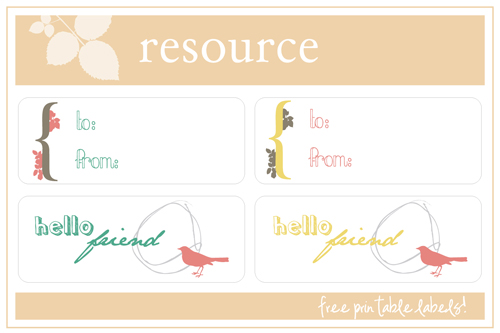
for our thursday resource, i've created a template with some simple gift tag designs. this template works perfectly with these white mailing labels, by avery dennison. they are available at any office supply store. the label size is 2.625" x 1" and there are 30 labels per sheet. here is a preview of the template:

click here for the download.
* window will bring up the pdf file in it's full size. simply go to "file" (at the top) and click "save as" and save it to your computer.

( avery label products that work with this template: 5160, 5260, 5520, 5660, 5810, 5960, 5970, 5971 , 5972, 5979, 5980, 8160, 8460, 8660, 8810 )

next week, i'll have a standard card template that you can cut out on your own, if you don't have these labels to print on. this thursday column can be anything related to a resource like freebies, craft sites, tutorials, etc! if you have something you'd like to submit, please email me.

Checking in..

15

October 10, 2012


Hi Friends! Just wanted to stop in and say sorry for the missed posts this week! I didn't have much prepared to post so I'll be absent this week and will return to posting next week. It's crazy how fast this month is going. Well, I didn't want to leave you with nothing so here are some lovely links I have stumbled upon lately that I wanted to share with you!

1) oh, hello friend events have been updated for the holiday season! Be sure to mark your calendars and stop by to get some shopping done! Our holiday schedule includes Portland and Chicago too so I hope you can come! The holiday shows are always the best! :)

2) Did you guys see that Southwest is having a 40% off sale? The travel dates are kind of specific - they apply between 11/28-12/12 and 1/7-2/14/13 - but it's an amazing deal! Trying to be responsible, I booked our flight for Renegade Chicago early and ended up canceling it last night to re-book with the sale discount. Got over $140 back in credit! Check it out!

3) In case you missed it, Pugly Pixel launched her STYLE - course, where Katrina shows you step-by-step how to build a blog template using CSS & html. I am seriously going to try to get around to sitting down and learning this soon - this kind of knowledge is so priceless! It isn't on a set schedule so you can sign up for 30-day access and go on your own schedule, awesome! At only $25 dollars for the course, what a steal.

4) Have you guys heard of blog brunch? I recently stumbled upon this amazing resource lately and it is such a great idea to bring the blog community together! Each month they have a specific topic that you gather on twitter and discuss! Their next meet-up discussion is "finding your blog's voice" - love this!

5) Came across this fun resource - The Inked Nest. Really fun hand drawn illustrations, vector, and clip art that you can purchase and use for your designs!

Hope you found a resource or two from those links :) Will try to share more "loved lately" links in the future - if you have any links to share, leave them in the comments and I'll be sure to look over them! Happy Wednesday, see you next week friends!

( resource )

2

October 8, 2009

( resource )

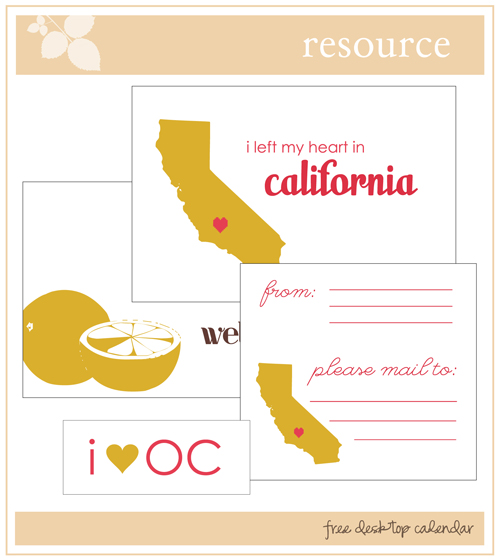
hello friends! for today's resource, i am redirecting you to kirei nest: where i am guest posting for nicole's weekly "Locale Lovelies" column! i have wrote about places in orange county: my hometown! and i also made some printable notecards, tags, + mailing labels with the california theme. be sure to stop by and read other locals posts like audrey from urbanic paper who wrote about venice!

( resource ) printable notecards:

17

June 25, 2009


( resource )
hello friends!

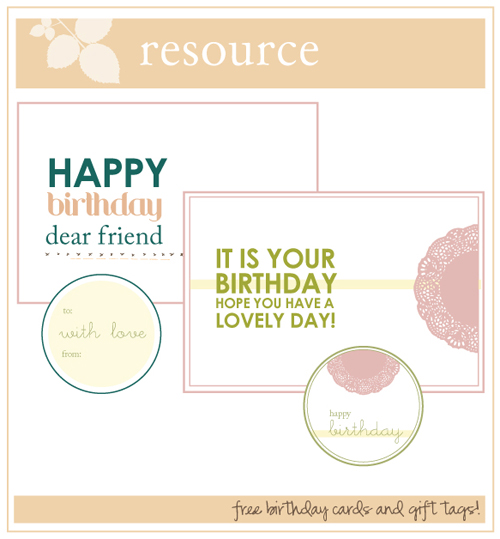
well, to go along with the birthday theme this week, i've created some simple birthday cards and gift tags for you to download. so if you have any birthdays coming up, you can make your own cards!

( click here to download )

last week i think there were some issues downloading the file and i apologize for that. but i tested it this week so it should work fine ;) when you click the link, just click "save file" and it will download right into your computer. if not, i uploaded a the high quality .jpg file here so you can just save that to your computer and print it that way. enjoy!

( ps: i'm having a birthday sale tomorrow in the shop! check back for details )

resource:

( resource )

40

January 7, 2010

( resource )
aw. i haven't done a resource in a while!
well i thought for the new year, we'd start off
with a new desktop calendar!

available in 3 screen sizes.
hopefully one of these will work for your computer :)

click the link and download your size:

1024 x 764
1280 x 1024
1920 x 1200

hope you like it.
xo.

( resource ) fonts:

10

July 23, 2009


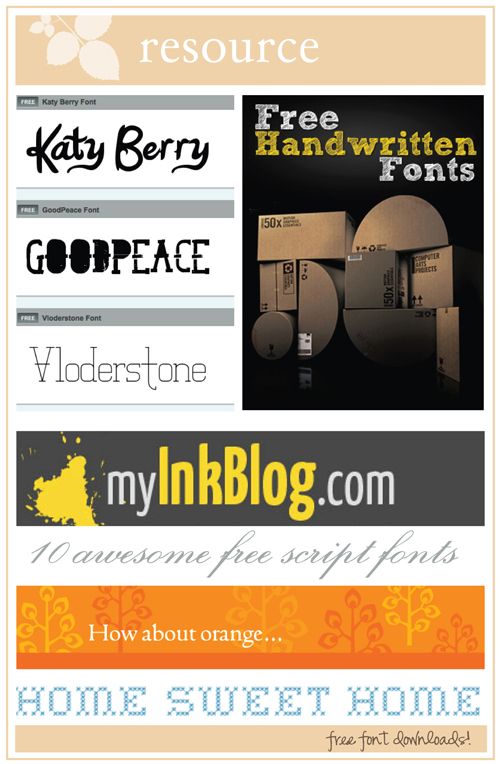
so today's resource is a collection of free downloadable fonts!

ffonts.net - a great collection of fonts.
instantshift.com - 50 Free Handwritten Fonts
myinkblog.com - 10 Awesome Free Script Fonts.
how about orange - free stitch fonts.


new changes, the daily:

2

June 1, 2009


presenting:

oh, hello friend: the (new) daily!

back in december, I created a schedule of posts called, "the daily" which featured a certain theme or topic that was posted on it's designated day, daily! i was pretty consistent in posting new content every week and it was nice to add some organization to the blog. with the new blog redesign, you will notice some pretty new 'daily' headers. here is a look at the old daily:

the daily / goodbye old:

Photobucket
Photobucket
Photobucket
Photobucket

i enjoy change and i thought with the blog redesign, it would be nice to have a new schedule as well. so, i would like to present the new oh, hello friend daily schedule!

the daily / hello new:


( MONDAY )
weekly giveaway.

that's right, we've got sponsors lined for a lovely giveaway that will happen here every week! so be sure to check back and win some amazing prize

( TUESDAY )
inspire: lovely.

( WEDNESDAY )
lovely goods

( THURSDAY )
resource

this is a new topic that i thought would be fun for all the readers. each week i will offer a resource: it could be a really cool font, a template, tips on designing or crafting, something made by me for you to use, the possibilities are endless!

( FRIDAY )
weekend roundup

weekend roundup is a list of week-end links collected from the blog world that may inspire, entertain, encourage, or motivate you over the weekend! this in a way will replace our previous daily, "link love" - friday will also feature classifieds, if anyone has any announcements.


so that is it! i hope you enjoy the new content! the posts will not be limited to these things, i will of course post fresh new content along with the dailies. if you would like to see a certain daily , simply click on any of the banners on the right and it will take you right to them! if you have something to submit for any of the daily 's, please email me!


( resource ) blogger tips + tricks:

19

August 13, 2009


okay, it's double resource day because I just have to share this with you! I literally yelled "no way" out loud when I found this. ;)

I was talking with a friend (at the blog social, though I can't remember who.. so if it was you, I hope you're reading this) about how we wished we could number the comments, in blogger like wordpress does. For giveaways in the past: I've literally sat and counted down to comment # 400 out of 900 or whatever, hahaaaa.

Well, I stumbled upon this when going to this lovely blog: BLOGGER PLUG INS.. and there it was, on the first page. So for those of you who didn't know this existed, I present to you:


!!!!! How silly. Why didn't I think to search this before? It's super easy, you just have to replace code in the "edit html" section of your blog. Is ANYONE else as excited about this as I am? ;)

Anyway, Blog plug ins are seriously so cool! lol. I'm a bit of a nerd. But I have just entered a whole new world of things I can do with my blog beyond what blogger offers. Here are some other blog plug-ins of interest:

How to Remove Label Post Count + Top Commentators Widget for Blogger + I recently had an incident where someone copied my entire blog design. So this a pretty valuable one: Disable Right Click on Blog.

Have fun!
xo.

( resource ) how to use a custom blog template:

11


How to upload a
custom blog template!


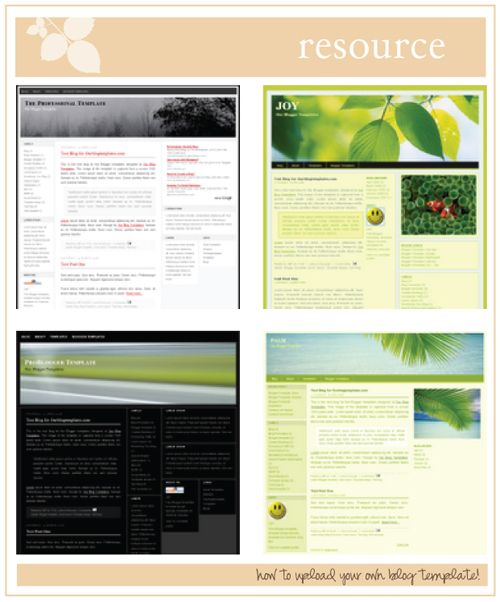
So for today's "resource" - it gets a little technical ;) But it's super simple. I occasionally get questions on how to use a blog layout or upload a new template so I decided to just post this for everyone. This is for blogger users only: sorry I don't know anything about wordpress or typepad.

These images are rather small so if you want the full size images so you can see the detail, go here.

So, you can browse these free blog template sites and find the custom layout you want to use.

http://btemplates.com
http://ourblogtemplates.com


Your rest of the post here blahh..


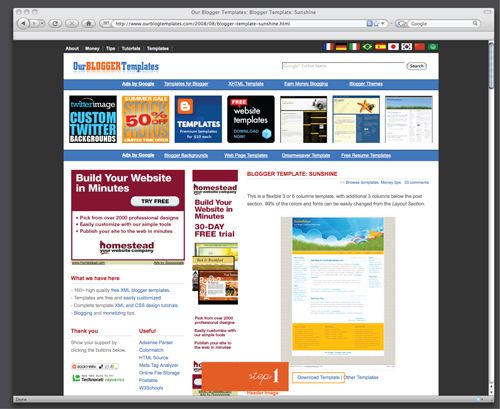
1) Find the template you want and Download template. For this example, I am using "Sunshine" -- Click "Download Template"


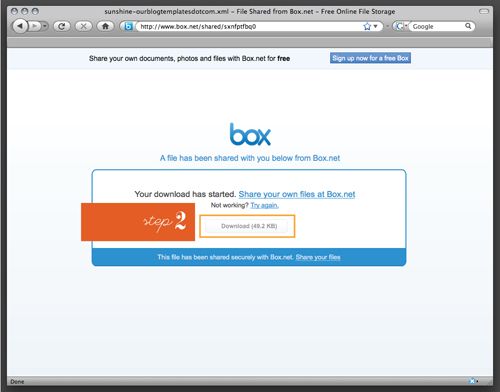
2) It might take you to a page where the template is available for download. Click the "download" button.


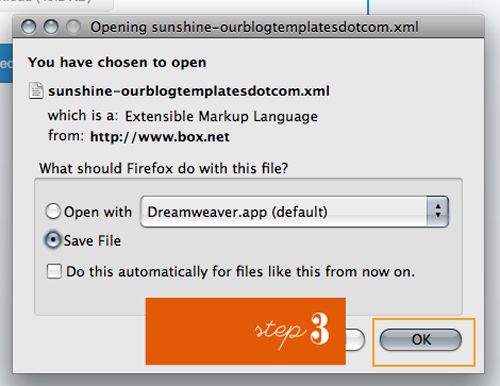
3) Your computer will then open a box asking you if you want to open the file or save the file. (This will also appear on a PC) Click "Save File" and hit OK.


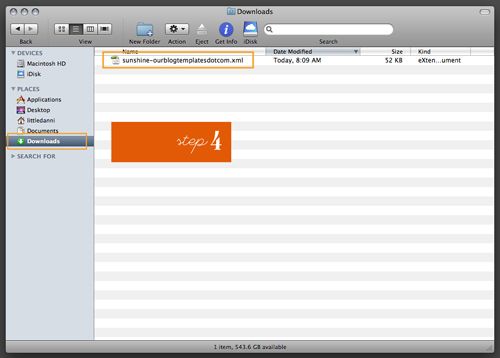
4) You will have then downloaded a .XML file which is the file that has all the code for your new blog layout! You do not open this -- you simply upload it to blogger. You must locate it on your computer. Windows users, I am not sure where it might go - perhaps "My computer" ? Mac users: it probably will place the file in your "downloads" folder.

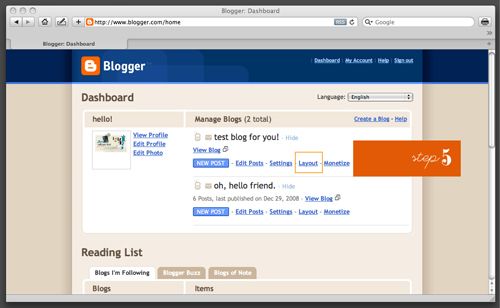
Now go to your blogger dashboard.. log in if you need to ;)


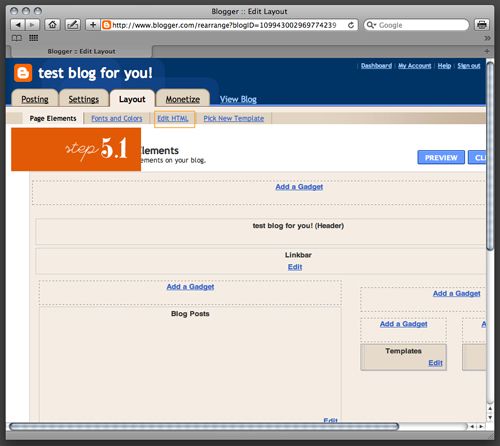
5) Click "Layout" which is a 'tab' at the top. Then click "edit html"


6) Before you upload anything new, you'll want to first "Download Full Template" to save a copy of your current blogger template, in case you don't want to go back!

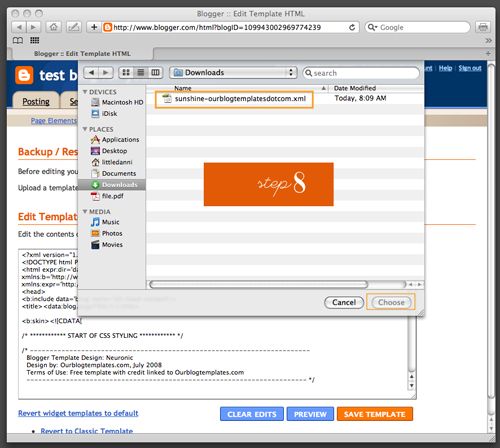
7) Once you've saved a back up of your template, click "choose file" or "browse"


8) Locate the .XML file and click Ok.

9) Then click Upload.


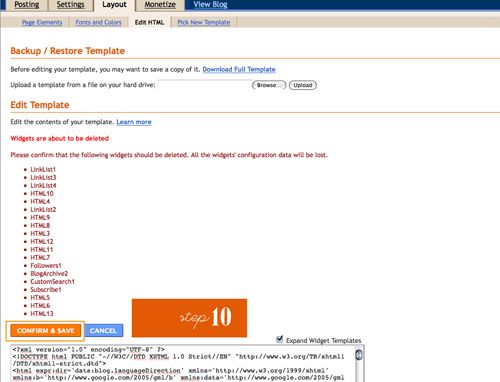
10) You might receive a message saying your blog widgets/lists/etc will be deleted. In the past, I have always just recreated these (very time consuming) but last night, found this article: How to change a blogger template without deleting the widget! so try reading it to see if you can save your sidebar items!

AND THAT'S IT! :) A new blog layout in only 10 easy steps! just comment if you have any questions and i'll try my best to answer them.


( resource ) desktop calendar:

22

October 1, 2009

( resource )
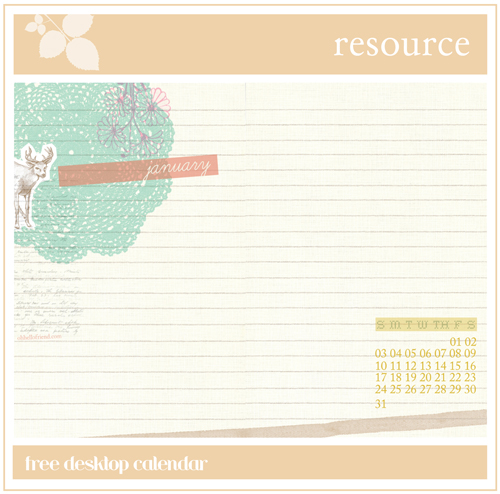
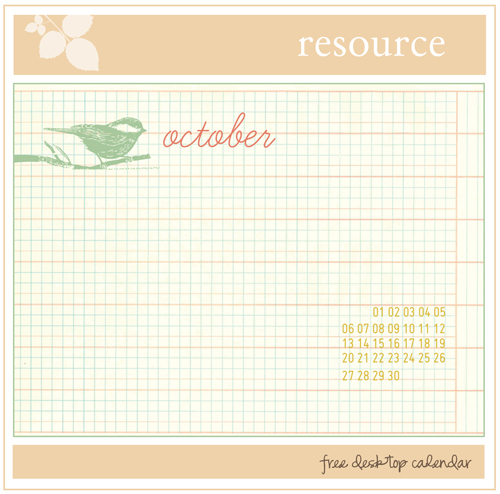
since it is a new month, i made a desktop calendar for your computer.
you could even print them if you wanted to :)

download the file here.
contains 4 files:
2 desktop sizes,
1 with days and 1 without
.

( resource ) mailing labels:

11

July 2, 2009


( resource )
print and cut!

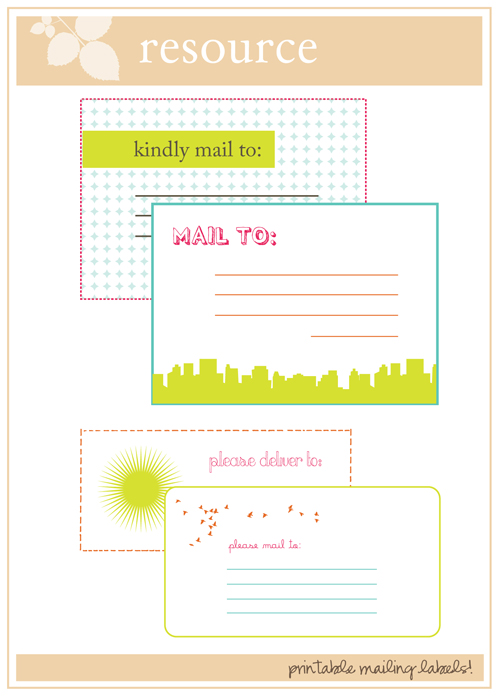
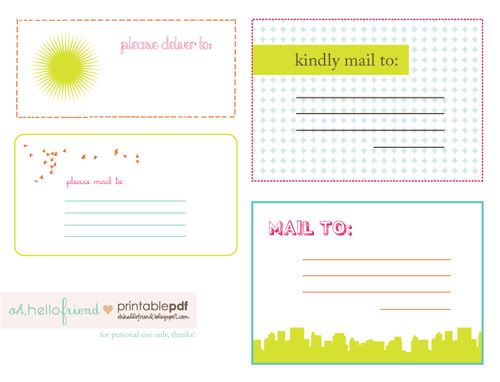
i really like mailing labels. so here are 4 labels you can download and print.. print them on regular paper or buy some sticker paper so you don't waste tape ;)


resource / email buttons:

22

February 28, 2012

I posted some free resource email buttons back in 2008, wow that doesn't seem long ago, that is a pretty long time ago! ;) ... So I thought it was definitely time to post some new ones for you. These buttons are all .png files so they can be placed against any colored background.

Grab the links here at photobucket!

For those who aren't sure how to use these, here are some (hopefully) simple instructions on how to use email buttons. Copy and paste the code below and place it where you'd like your button to go. (if on blogger, add a "html snippet")


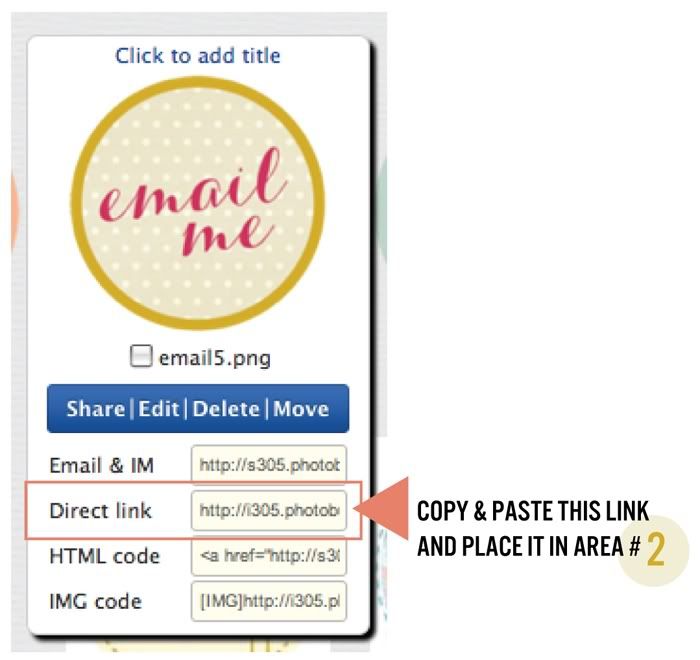
Here's a graphic example of what areas you need to change in the code above:

Change the areas colored in pink:

#1 - enter your email address
#2 - place the .jpg url for the graphic here (see example of where to get this code below)
#3 - if your sidebar has a certain width, you can control it here. if you're not sure what size to put, this can be tested by trial and error. enter a number & if it's too big, you can go lower or higher, etc.
In the photobucket album, be sure to copy & paste the "Direct Link"
section and place it in area #2 of the html code.

Okay, hope that wasn't too complicated and hope you enjoy the buttons!

ps: someone commented last time wondering how to add the text area boxes at your own blog. Simply add these html tags in your post <*textarea*> place whatever text you want in the box here <*/textarea> -- just remove the * stars and it should work!

( resource ) using social network icons:

5

August 27, 2009


how to add SOCIAL NETWORK ICONS:

i received some comments from readers that they downloaded the social network icons that i posted about a couple weeks ago, but they didn't know where to go from there. so for this week's resource, we are going back to basics: an html code that all bloggers should know!

note: this also goes for ANY image you want to post on your blog! just change the address + the photo link! :)


STEP ONE: Find the set you want to download -- LOTS available for free download! Here are a few places I've found free icons at: 25 amazing social media icons set + 20 free social media icons for bloggers + collection motherload: 600 icons!


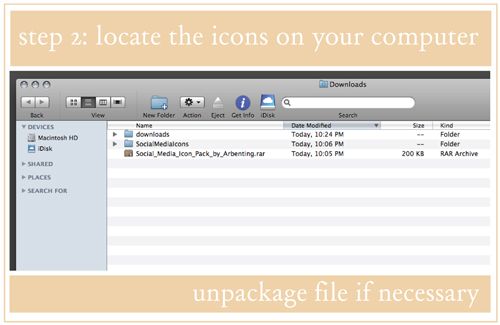
STEP TWO: locate the folder the images were downloaded to on your computer.

note: They will most likely come in a 'packaged' file.. for instance, this download is a .rar package file. This one is a .zip file -- either way, you need some sort of program to 'unstuff' them. I have "stuff it expander" downloaded on my computer and once I download a packaged file, it just does the rest for me! Then when I go to my downloads, it has the un-packaged file! Nick told me you need WinRAR to unpackage a .rar file. If anyone needs help with this, just comment with the icon link you want to download and I can possibly download them for you and send you the icons you want to use. I'll try to help everyone.. If there is a lot, maybe everyone can help eachother out :)


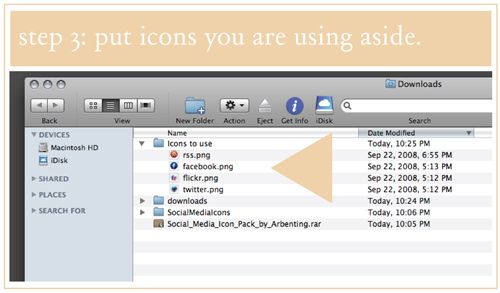
STEP THREE: place the icons you are using aside in a separate folder. In this instance, I am using twitter, rss, flickr, and facebook.


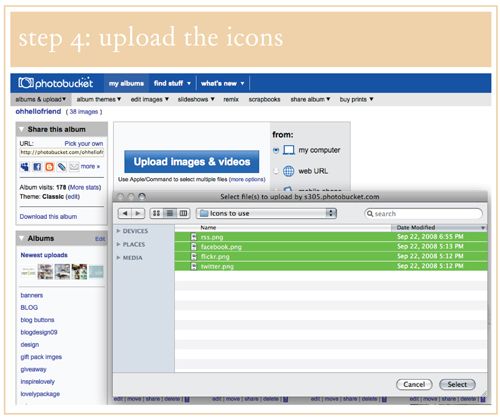
STEP FOUR. Go to an image hosting site such as photobucket, flickr - or you can host them on your own server if you have space! I will use photobucket. Upload the image files.


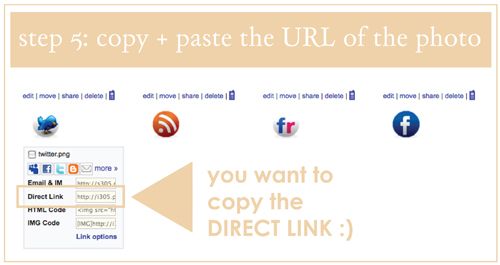
STEP FIVE: Copy & paste the DIRECT LINK or address of your image.

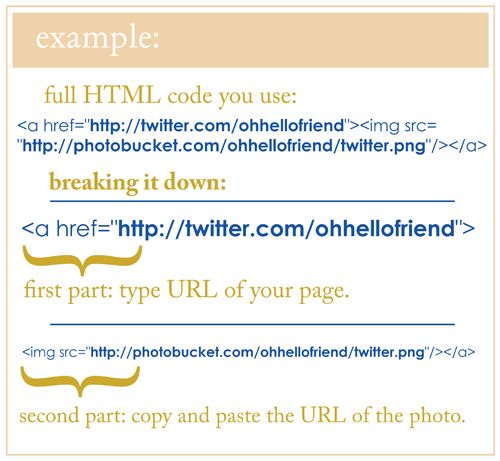
STEP SIX: Here is the HTML link that you need to post a linking image on your blog. Change the parts where I type URLofLINKgoeshere :)There is an example below:

COPY & PASTE:


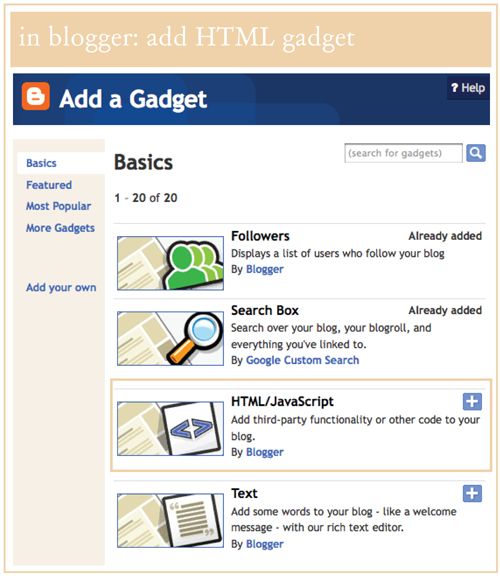
STEP SEVEN: Lastly, in blogger, click "add a gadget" in layout and add the HTML gadget ;)

copy and paste your code and YOU'RE ALL DONE! :) Hurray! Please leave comments with questions, or if this was helpful to you.

Again, this works for ANY IMAGE you want to post as a link! Use it for an email button, an etsy shop button, a friend's banner, whatever!

( resource ) printable notecards:

12

June 11, 2009


( resource )
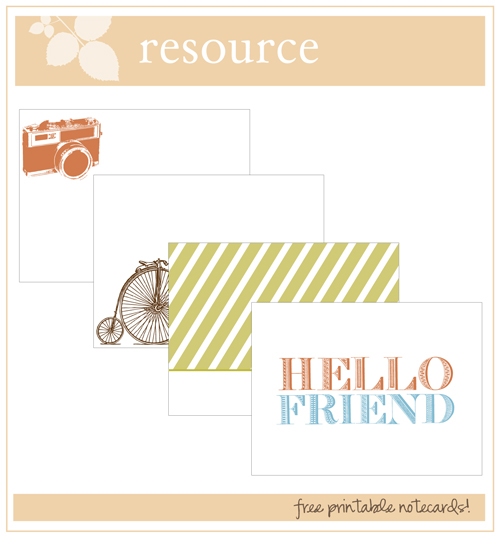
free printable notecard PDF, 4 designs! simply print + cut out!

click here to download.
( download should start immediately. if it doesn't, it will take you to the pdf page. simply click 'file' and 'save as' and save to your computer! if the above link doesn't work, click here and try this download instead. )

please email me if there are any issues!

'hello friend' notecard made with free vector typeface 'RPVS' by mmolai. click the link to download it for yourself!


resource link list for alt:

9

January 19, 2012

should i post this image? by pia jane bejkirk

Pardon the random post but this is a link/resource list mentioned at our Alt Summit Panel today: Blogging Ethics & Etiquette. More to come on all the panels from Alt Summit!

Finding proper links for images:


Great discussions and articles:

Frolic - blog talk: crediting photos
Jessica Hishe - inspiration vs imitation
Erin - let's talk photo crediting
Grace - Biz Ladies: Online Etiquette Part One, Two, & Three

Stock photo sites:


( resource )

27

February 11, 2010

( resource )
hi friends! today i created a valentine pdf download for you! it contains two 4x6" postcards in case you need a last minute note for friends. simply download the pdf here!

anyway, i'm going to take off posting tomorrow as i'm finishing up selling at uc irvine and getting ready for the weekend. so i hope you all have a most wonderful weekend! (and long 3-day weekend for some of you!)

this weekend we are attending a relationship conference, going to a flea market, and looking at some more wedding venues. what are your plans? :) see you lovelies on monday. xo.

alt summit extravaganza:

34

January 25, 2012

Okay, this took me a while to get together but I realized I've attended alt for 3 years now and haven't even posted a follow-up about the panels so this year I am determined to get it up. I went to a few panels the first day but the 2nd day we had a baby shower for a friend so I wasn't able to make it to any sessions. So here you go: my full alt recap! :)


On Wednesday afternoon, Alt gave attendees the opportunity to attend Shift Summit. I figured why not take in all the opportunities to learn that I could, so I signed up and I am so glad I did. Here are some points I took from it that really stood out.

Regarding sharing:

- There's never been a time that individuals have been so empowered to have influence on the community.
- Appeal to consumers motivation to connect with each other, not just with your brand.
- Sharing comes down to one thing - its about embedding your content in a message that others do want to share.

Regarding Social Media:

I thought one of the most interesting things said at this panel was by Kyle Snarr from StruckAxiom.

"You cannot just be on facebook and twitter anymore .. its not enough."

To some of us, this may seem really crazy because we can hardly keep up with twitter/facebook as it is. He went into talking about something called The HUB THEORY: It's this notion of picking a location, a place to point your social avenues to - i.e.: your main dot.com website or your blog. Kyle says finding out that right social media mix for you is critical - figure it out and then publish everywhere. Facebook / twitter / youtube / pinterest / tumblr / linked in / flickr.

So everything is at one central hub. For me, my "main hub" is my blog. What is yours? Kyle then says you need to be using Social Media as avenues to direct back to your main hub. Take your content and push it through instagram. or twitter. Everyone is on different communities, they are different groups of people. Personally, I am not on instagram because they don't make it for my phone. But thousands are. Take a photo, share it on instagram and direct that traffic back to your blog. I don't really use facebook but thousands of others do and I have it for my blog. It may seem like a lot but really, you're essentially managing one main community and using social media to direct impressions back to your site.

Adam Young from rcwilley.com pointed out to figure out where you want to focus your social media efforts - for their company - they chose to do it through Facebook and their email database.

While you can be in all the social media places, Adam points out it is most important to focus on branding. Be consistent with your brand. This is always essential. If you're all over the place and fall out from what you truly are, it does not give a true representation of who you are. Your brand IS your social strategy. They're not different, but they are one in the same. Brand brings definition.

Wrapping it up:

Focus on QUALITY, ORIGINAL CONTENT. This seemed to be a main theme at the conference. The speakers stress to focus on fresh original homemade homegrown content. Focus on quality. Take a quick class to become a decent photographer. Thats all it takes. Keep in mind the long term trend toward this usefulness. your posts - have them be useful.

This was a great panel featuring:

Regarding Balance:
Balance is a state of flexibility that allows me to be creative. To stay balanced, you need to constantly be open to flexibility. It's not this picture perfect life. It's constantly changing on so many levels. The balance is in keeping perspective and always having what is important it in your mind.

Regarding Focus:
They talked about focus and joked about having 17 windows open, then hopping over to twitter. then to pinterest. Isn't this all too familiar with so many of us? My brother came over one day and say all the windows and tabs I had open and said "Man, I'd be stressed out too if I had a desktop like this." haha. I've joked with friends about how crazy it is that we can have so many windows open at once. Maybe it's a way to make us feel like we're busy but we don't need to be inventing ways to feel busy. We can turn it off, just make a deliberate effort to do that. Make effort to CLOSE THE WINDOW and only have 1 window, 1 project going on at a time. When it is finished, then I can go focus on another thing.


Regarding Living:
Here are some notes I typed up that the panelists said:

"its okay for my blog not to grow the fastest or have the most traffic or make the most money. I am better creatively when I am stopping and taking care of myself. It makes my blog better. For me, its giving myself the permission to say "I'm going to stop here. I'm not going to keep going going going. make myself sick" -- This idea of consciously living - taking a long view of who you are. what matters to you. what's important. where you live is irrelevant. who am I, why am I here. What am I supposed to be doing. What do I feel when I wake up in the morning? Your blog/shop/whatever - doesn't have to be your only measure of success. Be authentic about the path you are choosing.

DO WHAT YOU DO BEST AND LET OTHERS DO THE REST
I am going to make a little less money but I will be so much more happy. I can do taxes and package orders but its not what I was made to do. Hire someone to package your orders and free up that time for you to do something else.


I was on a panel with some lovely ladies: Kal Barteski, Sarah Wert, Tracey Clark. Here are some points I touched on about regarding Blog Etiquette:

Regarding Comments:

- Leaving Comments are really about showing support
There isn't one single rule about comments but generally, and I've realized this just recently: We really show support by leaving comments. If you used a recipe or found a great diy resource, leave a comment to let them know you appreciate them. Bloggers work hard to put together content. One blog I regularly frequent expressed she would put so much work into her posts and receive no comments, it was discouraging so she just disabled her comments entirely. I thought that was really interesting but also kind of sad too. Comments are just a nice way to support this special blog support community that we are a part of. I know I actually need to be more intentional about leaving more comments on blogs who I appreciate and clearly put a lot of work + effort into their posts. I think for me, I already feel like I don't have enough time in the day. But it's just about taking an extra 5 or 10 minutes to leave a comment. What do you think?

-Don't self promote in your comments
This pretty bad etiquette. Leaving a thoughtless comment to self-promote yourself like, "nice post. By the way, I'm doing a giveaway here! link." Use the "name/URL" box (or have the link attached to your blogger profile) and if someone wants to click to your site, they'll find it that way.

Regarding Copying:
I talked a little about this because a couple years ago, I got my entire blog design copied. Not sure if you've ever been in a similar situation or experience yourself.. I've heard countless stories from other blog friends about this. Here are some points I talked about:

- Choose your battles.
Grace Bonney from Design Sponge actually said this in her panel last year and I've always remembered it because it's so true. Some things just aren't worth the time and effort.

- Don't air your dirty laundry.
It happened early on in my blogging years and my initial response was to do a post about it and let all the world know this girl was a big fat copycat. Thankfully I had some nice blog friends who I emailed and they advised me not to post about it, but deal with it privately and I did. It was definitely better to handle it that way in the long run.

- Copying / Being Inspired.
Take an idea and make it your own. Work off that idea to make a new idea. In our ever growing creative community, it is really hard to come up with something completely 100% original. It's a tough line because yes, we all gather inspiration from each other to some degree. But we also need to do this on a conscious level.

Regarding Crediting:

To be honest, and some of you may remember, I didn't always used to credit properly. It seems like this should be a given and common sense but I honestly just didn't know. I think so many people just don't realize. But it starts with us, we need to all set the example and others will hopefully follow.

- Give credit where credit is due.
If you see a decorating idea and use it on your own blog, just leave a comment to where you saw the idea first. People aren't going to think you're unoriginal or not creative.. I have a friend who gets copied all the time, for some reason the blogger copying her will just not leave her link crediting back. I really don't get it.

- Make effort to find the proper credit
Pinterest / weheartit / imgfave - are not proper credits. I posted a resource link list here the other day with tineye + google image search (which a reader actually told me about) If I want to use a photo that doesn't have the right credit, I'll take that extra time to search for it and try to find the original source. If I can't find it, I won't use the image.

- Put a disclaimer on your blog.
If you don't want people to use your stuff, post it somewhere on your site. Now and days you see copyrights and messages on blogs like, "all content the right of so and so" .. I personally don't mind if people use my photos but someone else may. I put a little button on my site that says "use my photos, just credit" - so if you are posting your own photos and everything, make it clear about your preferences.


If you want to read even more, check the Alt Blog for lots of recaps. You can also go through the thousands of #altsummit tweets for great quotes from bloggers tweeting during the event. Anyway, here are some images from the fabulous Friday night parties they had.


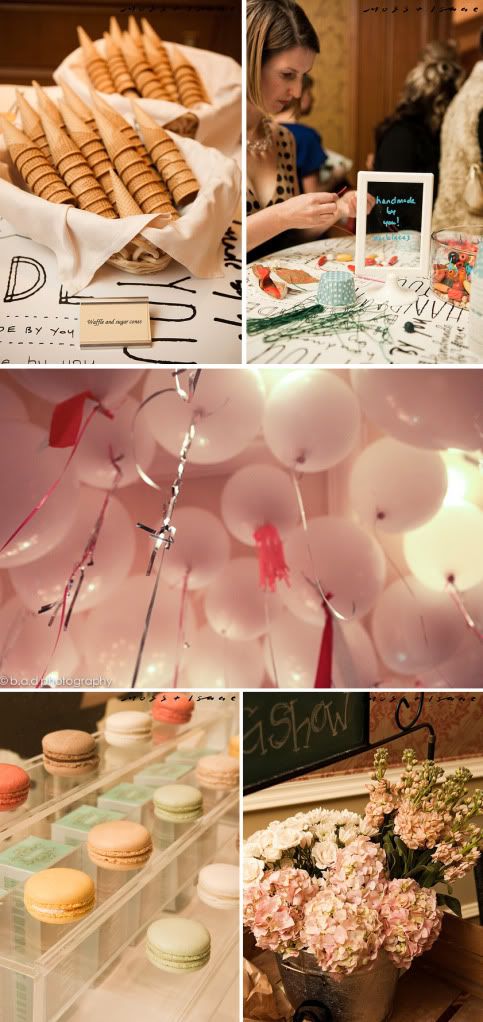
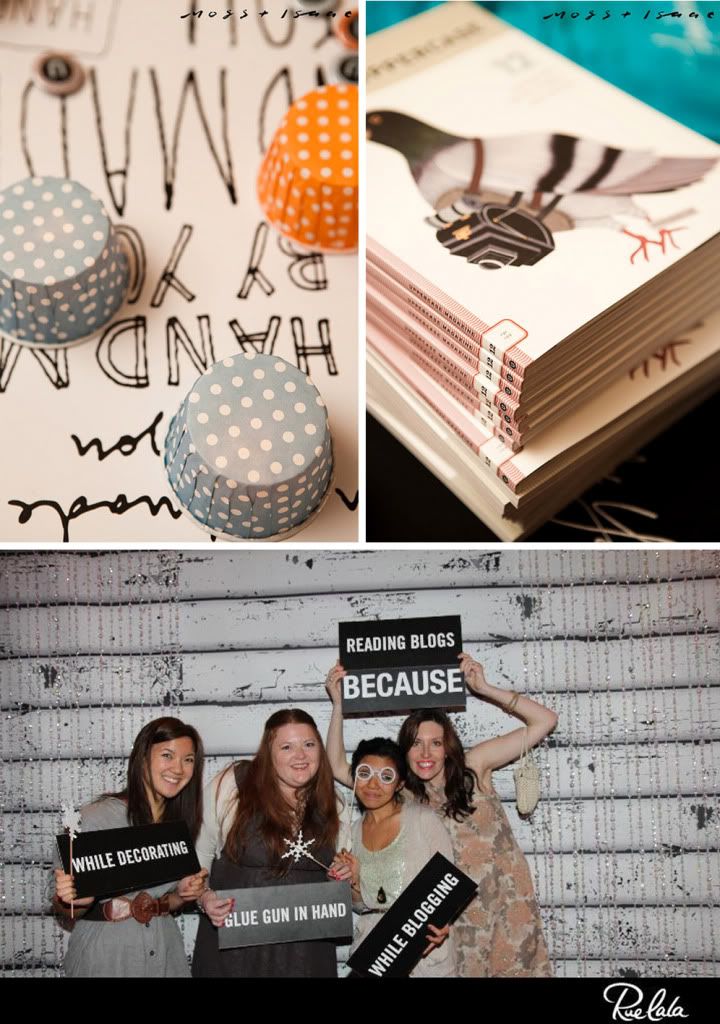
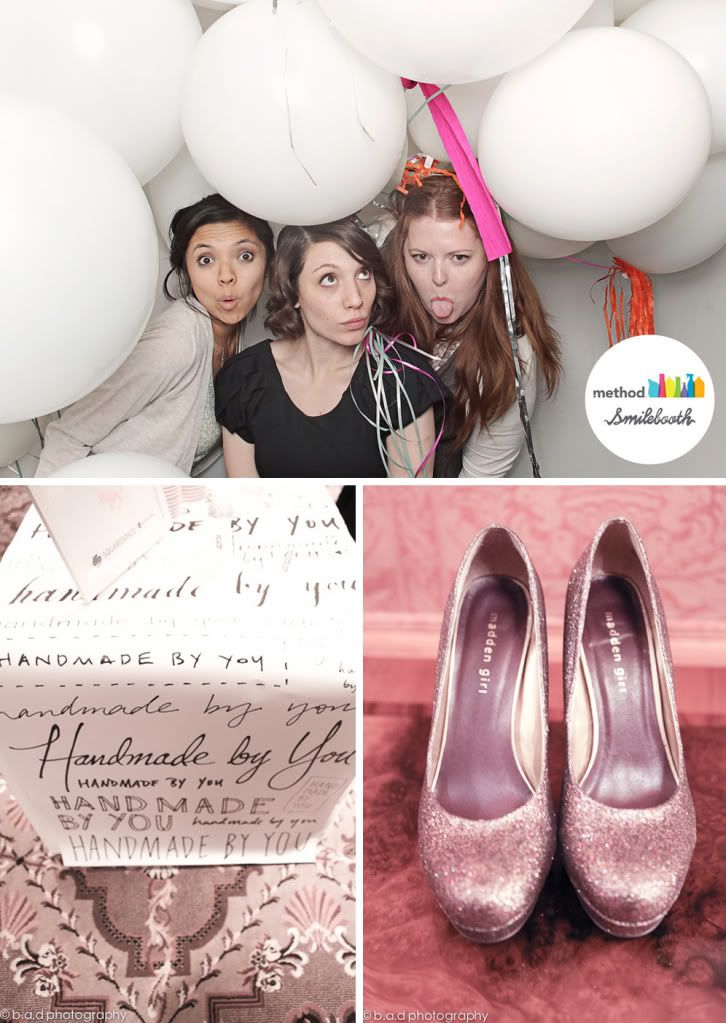
Had so much fun hanging out with friends: Lillian, Beth, Karen, Melanie. There were lots of photo booths, smilebooth was a favorite and ruelala's was super cute too.